August 16, 2021

.NET Core Worker Service - Implementing by IHostedService

In ASP.NET Core, background tasks can be implemented as hosted services.

ASP.NET Core 3 offers a new feature to implement Windows Service, i.e. Worker Service.

Worker Service is an ASP.NET Core project template that allows you to create long-running background services. The interesting point is that dependency injection is available natively with Worker Service project template.

You can implement Worker Service class by two ways:

  • Implement the IHostedService interface
  • Derive from BackgroundService abstract base class

In this post we will see an example how to define Worker Service by implementing the IHostedService interface.

I am using Visual Studio 2019 Community Edition and .Net Core framework 3.1. Lets start creating new project.

Create a new project.

Select the template Worker Service from all the available templates. You can search with relevant keywords from the top search bar.

Next, give project a name, in this example it is WorkerService1.

Next, select the target framework. (.Net Core 3.1 is selected in this example)

Define the service

Once the project is created, create a new class, say ProcessMessageService with this code:

public class ProcessMessageService : IHostedService
    {
        public Task StartAsync(CancellationToken cancellationToken)
        {
            DoWork(cancellationToken).GetAwaiter().GetResult();
            
            return Task.CompletedTask;
        }

        private async Task DoWork(CancellationToken cancellationToken)
        {
	//check if service is not canceled
            while (!cancellationToken.IsCancellationRequested)
            {
		//do actual work here...
		//we are writing log to text file every 5 seconds
				
		string folderPath = @"C:\Test\WorkerService\";
                string fileName = "ProcessMessageService-" + DateTime.Now.ToString("yyyyMMdd-HH") + ".txt";
                string filePath = System.IO.Path.Combine(folderPath, fileName);
                string content = DateTime.Now.ToString("yyyyMMdd-HH:mm:ss") + " - ProcessMessageService is running" + Environment.NewLine;

                System.IO.File.AppendAllText(filePath, content);

                await Task.Delay(5000, cancellationToken);
            }
        }

        public async Task StopAsync(CancellationToken cancellationToken)
        {
            await Task.Delay(-1, cancellationToken);

            cancellationToken.ThrowIfCancellationRequested();
        }
    }
	

ProcessMessageService class has implemented the interface IHostedService, so it have to define two functions:

  • public Task StartAsync(CancellationToken cancellationToken): will be called when the service is started.
  • public async Task StopAsync(CancellationToken cancellationToken): will be called when the service is shutdown/stopped.

Inside StartAsync() method, we have called our custom method DoWork() which will actually do the job we want this service to do. In this exmaple it is writing to text log file by every 5 seconds.

Install required dependencies

Make sure you have installed the following Nuget Packages for .Net Core 3.1.

  • Install-Package Microsoft.CodeAnalysis.Common -Version 3.11.0
  • Install-Package Microsoft.Extensions.Hosting -Version 3.1.17
  • Install-Package Microsoft.Extensions.Hosting.WindowsServices -Version 3.1.17

If you are using some later version of .Net Core, you may need to change the version of these Nuget Packages.

Register the IHostedService

In Program.cs file, you will find the function CreateHostBuilder() as:
public static IHostBuilder CreateHostBuilder(string[] args) =>
	Host.CreateDefaultBuilder(args)
	.ConfigureServices((hostContext, services) =>
	{
		services.AddHostedService<ProcessMessageService>();
	});
		

Make sure that in builder's ConfigureServices() method, you are adding your service through services.AddHostedService() function call.

Another important point is to call UseWindowsService() method from builder's object, otherwise you may get errors when you host this windows service and try to start it.

After making this change, the function will be like this:

public static IHostBuilder CreateHostBuilder(string[] args) =>
	Host.CreateDefaultBuilder(args)
	.UseWindowsService()
	.ConfigureServices((hostContext, services) =>
	{
		services.AddHostedService<ProcessMessageService>();
	});
		

The coding part is done, next step is to publish the Worker Service to an exe file, which will be covered in next post.

References:

Related Post(s):

July 19, 2021

AngularJS - Sharing data among Controllers

In AngularJS, you can share data among different componenets, e.g. Controllers, by multiple ways.

Using HTML5 storage features

HTML5 provides localStorage and sessionStorage, but using HTML5's localStorage, you would require to serialize and deserialize the objects before saving or reading them.

For example:

var myObj = {
firstname: "Muhammad",
lastname: "Idrees"
}

//serialize data before saving to localStorage
window.localStorage.set("myObject", JSON.stringify(myObj));

//deserialize to get object
var myObj = JSON.parse(window.localStorage.get("myObject"));

Using ngStorage

To use ngStorage, you have to include the ngStorage.js in your index.html alongwith angular.min.js.

<head>
<title>Angular JS ngStorage Example</title>
<script src="https://ajax.googleapis.com/ajax/libs/angularjs/1.8.2/angular.min.js"></script>
<script src="https://cdnjs.cloudflare.com/ajax/libs/ngStorage/0.3.11/ngStorage.js" ></script>
</head>

ngStorage provides two storage options: $localStorage and $sessionStorage.

You need to add ngStorage (as require) in the module, and then inject the services.

Suppose, if myApp is the name of the app module, you would be injecting ngStorage in myApp module as following:

var app = angular.module('myApp', ['ngStorage']);

After that, you can simply inject $localStorage and $sessionStorage services in controller function.

app.controller('controllerOne', function($localStorage, $sessionStorage) {

// an object to share
var myObj = {
firstname: "Muhammad",
lastname: "Idrees"
}

$localStorage.someValueToShare = myObj;
$sessionStorage.someValueToShare = myObj;
})

.controller('controllerTwo', function($localStorage, $sessionStorage) {

//here you can read data from $localStorage & $sessionStorage
console.log('localStorage: '+ $localStorage +'sessionStorage: '+$sessionStorage);
})

$localStorage and $sessionStorage are globally accessible through any controllers as long as you inject those services in the controller functions.

Using Service

You can create a service to hold the data that need to be shared among different controllers. Then you can simply inject that service in the controller function where you want to use it.

Here is the service code:

app.service('myDataService', function() {
var someData = {};
getData: function() { return someData; },
setData: function(dataToShare) { someData = dataToShare; }
});

Here is how controllers will consume the service myDataService and share data:

app.controller('controllerOne', ['myDataService',function(myDataService) {

// To set the data from the one controller
var myObj = {
firstname: "Muhammad",
lastname: "Idrees"
}
myDataService.setData(myObj);
}]);
app.controller('controllerTwo', ['myDataService',function(myDataService) {

// To get the data from the another controller
var result = myDataService.getData();
console.log(result); 
}]);

July 18, 2021

Dynamic where clause in Linq to Entities

Suppose you want to write Linq Query to filter the records by multiple parameters.

For example you have following method which will filter records based on the array of paramters specified.

public static List<Product> GetProducts(string[] params)
{
	var myQuery = from p in ctxt.Products
				select p;

	foreach(string param in params)
	{
	   myQuery = myQuery.Where(p => p.Description.Contains(param);
	}

	var prodResult = prod.ToList();

	return prodResult;
}

This query works fine if you need the AND concatenation of all parameter filters, you want to fetch records when all the paramters need to be statisfied.

What if you want to write the same query but with OR concatenation, as if any of the parameter is passed, it should return the records.

Here comes the PredicateBuilder by Pete Montgomery which will work with Linq-to-SQL and EntityFramework as well.

There is another PredicateBuilder by albahari , but it does not work well with EntityFramework.

You can use the following code for PredicateBuilder (copied from Pete Montgomery's post).

/// 
/// Enables the efficient, dynamic composition of query predicates.
/// 
public static class PredicateBuilder
{
    /// 
    /// Creates a predicate that evaluates to true.
    /// 
    public static Expression<Func<T, bool>> True<T>() { return param => true; }
 
    /// 
    /// Creates a predicate that evaluates to false.
    /// 
    public static Expression<Func<T, bool>> False<T>() { return param => false; }
 
    /// 
    /// Creates a predicate expression from the specified lambda expression.
    /// 
    public static Expression<Func<T, bool>> Create<T>(Expression<Func<T, bool>> predicate) { return predicate; }
 
    /// 
    /// Combines the first predicate with the second using the logical "and".
    /// 
    public static Expression<Func<T, bool>> And<T>(this Expression<Func<T, bool>> first, Expression<Func<T, bool>> second)
    {
        return first.Compose(second, Expression.AndAlso);
    }
 
    /// 
    /// Combines the first predicate with the second using the logical "or".
    /// 
    public static Expression<Func<T, bool>> Or<T>(this Expression<Func<T, bool>> first, Expression<Func<T, bool>> second)
    {
        return first.Compose(second, Expression.OrElse);
    }
 
    /// 
    /// Negates the predicate.
    /// 
    public static Expression<Func<T, bool>> Not<T>(this Expression<Func<T, bool>> expression)
    {
        var negated = Expression.Not(expression.Body);
        return Expression.Lambda<Func<T, bool>>(negated, expression.Parameters);
    }
 
    /// 
    /// Combines the first expression with the second using the specified merge function.
    /// 
    static Expression<T> Compose<T>(this Expression<T> first, Expression<T> second, Func<Expression, Expression, Expression> merge)
    {
        // zip parameters (map from parameters of second to parameters of first)
        var map = first.Parameters
            .Select((f, i) => new { f, s = second.Parameters[i] })
            .ToDictionary(p => p.s, p => p.f);
 
        // replace parameters in the second lambda expression with the parameters in the first
        var secondBody = ParameterRebinder.ReplaceParameters(map, second.Body);
 
        // create a merged lambda expression with parameters from the first expression
        return Expression.Lambda<T>(merge(first.Body, secondBody), first.Parameters);
    }
 
    class ParameterRebinder : ExpressionVisitor
    {
        readonly Dictionary<ParameterExpression, ParameterExpression> map;
 
        ParameterRebinder(Dictionary<ParameterExpression, ParameterExpression> map)
        {
            this.map = map ?? new Dictionary<ParameterExpression, ParameterExpression>();
        }
 
        public static Expression ReplaceParameters(Dictionary<ParameterExpression, ParameterExpression> map, Expression exp)
        {
            return new ParameterRebinder(map).Visit(exp);
        }
 
        protected override Expression VisitParameter(ParameterExpression p)
        {
            ParameterExpression replacement;
 
            if (map.TryGetValue(p, out replacement))
            {
                p = replacement;
            }
 
            return base.VisitParameter(p);
        }
    }
}

This will provide extension methods that you can use to write your queries. Here is an example how to write the above query with OR concatenation.

public static List<Product> GetProducts(string[] params)
{
	var myQuery = from p in ctxt.Products
				select p;

	Expression<Func<Product, bool>> x = null;

	int i = 1;

	foreach(string param in params)
	{
	   if (i == )
	   {
	      x = L => L.Description.Contains(param);
	   }
	   else 
	   {
	      Expression<Func<Product, bool>> y = L => L.Description.Contains(param); 
	      x = x.Or(y); 
	   }

   	   i = i + 1;
	}

	myQuery = myQuery.Where(x); 
	
	var prodResult = myQuery.ToList();

	return prodResult;
}

References:

June 24, 2021

SQL Server - Extended Events to trace Stored Procedure call

Extended Events enable users to collect necessary data to troubleshoot or identify a performance problem. Extended Events is configurable and scalable, because its a lightweight performance monitoring system that uses minimal performance resources.

Extended Events are replacing the deprecated SQL Trace and SQL Server Profiler features

SQL Server Management Studio provides a graphical user interface for Extended Events to create and modify sessions and display and analyze session data.

In this post I will explain how to create a session to collect data for a particular case, for example, trace execution of an SQL Statement.

Lets start creating our first session.

In SSMS, expand server node > Management > Extended Events > Sessions.

Right click on Sessions node and click New Session...

In New Session dialog > General Page > enter Session name, i.e. MySession

On the Events Page, in the textbox under Events library label, type sql_statement. Event list will be filtered.

Select sql_statement_completed, and click > button to move this event to Selected events list.

Click on the Configure button.

Select Filter (Predicate) tab

Click on the first row of grid and select field sqlserver.sql_text

In Operator column, select like_i_sql_unicode_string

In Value column, type the part of query for which you want to collect data. For example, I have written the name of Stored Procedure (MyProcedue) to collect data whenever this SP is called.

On Data Storage Page, In targets grid.

Select type event_file.

In the below pane, provide a file name where it will write the data.

On the Advanced Page, enter 3 seconds for Maximum dispatch latency.

Click OK.

Extended Events Session is created successfully.

By default the Session is not started (it gives you the option on General Page to start the session at creation, we have not selected that option in this exmaple).

We have to start the session manually by right click and select Start Session.

Once started, our Session is able to catch tracing data whenver the event occurs which we have defined in Events Page. In our example, we are checking for the query text that runs the SP MyProcedure. Try executing the SP a few times and see how this data is captured by the Session.

After the desired event is triggered (i.e. ran the SP MyProcedure in our case), Session has captured the data and stored in the target file which we have defined in Data Storage Page.

Expand the session node, and right click on package0.event_file and select View Target Data.

It will display the grid with event name (sql_statement_completed) and the timestamp when this event has occurred. Click any row to see more details about that particular event.

References:

June 1, 2021

SQL Server : Group multiple row values into comma-separated values

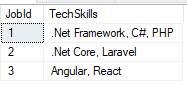
You may need to aggregate a column values for a given group of rows in a comma-separated string.

Lets say you have the following table:

DECLARE @tbl TABLE (JobId INT, TechSkills VARCHAR(100))

INSERT @tbl 
VALUES
(1, '.Net Framework'),
(1, 'C#'),
(1, 'PHP'),
(2, '.Net Core'),
(2, 'Laravel'),
(3, 'Angular'),
(3, 'React')

In this table, we have 3 distinct JobIds with multiple technical skills. If we use simple select statement it will return multiple rows for each JobId.

select * from @tbl

You can use subquery with FOR XML PATH to aggregate multiple row values in a single cell value.

SELECT distinct
    JobId,
    (
        SELECT ',' + TechSkills
        FROM @tbl t2
        WHERE t2.JobId = t1.JobId
        FOR XML PATH('')
    ) Concatenated
FROM @tbl t1

In the output you may notice that each value contains an extra comma at the beginning of the text value.

You can use STUFF function to remove this extra comma at the beginning of text string.

SELECT distinct
    JobId, STUFF(
    (
        SELECT ','+ TechSkills
        FROM @tbl t2
        WHERE t2.JobId = t1.JobId
        FOR XML PATH('')
    ),1,2,'') Concatenated
FROM @tbl t1