Showing posts with label Web-API. Show all posts

May 19, 2022

Configure IIS for CORS preflight OPTIONS request

To configure IIS to allow an ASP.NET app to receive and handle OPTIONS requests, we have to add the following configuration to the app's web.config file in the system.webServer > handlers section:

<system.webServer>
  <handlers>
    <remove name="ExtensionlessUrlHandler-Integrated-4.0" />
    <remove name="OPTIONSVerbHandler" />
    <add name="ExtensionlessUrlHandler-Integrated-4.0" path="*." verb="*" 
       type="System.Web.Handlers.TransferRequestHandler" 
       preCondition="integratedMode,runtimeVersionv4.0" />
  </handlers>
</system.webServer>

Since the default ExtensionlessUrlHandler-Integrated-4.0 module registration only allows GET, HEAD, POST, and DEBUG requests with extensionless URLs. We will replace this module by first removing it and add with different attribute values to allow OPTIONS requests to reach the app.

After making these configuration changes, if the application still not responding as expected then you need to check the IIS's Request Filtering. It might be the case that IIS disallows OPTIONS verb at the root web application level.

  • Open IIS Manager
  • Click on root application
  • Click on Request Filtering
  • If OPTIONS appears in list, remove that entry and re-add with with Allow Verb... context menu option.

References:

Related Post(s):

How Cross Origin Resource Sharing (CORS) Works

Browser security prevents a web page from making AJAX requests to another domain. This restriction is called the same-origin policy, which preempts a malicious site from reading sensitive data from another site. .

Cross Origin Resource Sharing (CORS) is a W3C standard that allows a server to lighten the same-origin policy. Because sometimes you might want to let other sites call your web API, in this case you have to configure CORS policy as per the requirements, so that the server can accept traffic for pre-defined scenarios and reject the calls otherwise.

You might enable the CORS using [EnableCors] attribute correctly in .Net Web API Project, but still the things don't work as per the expectation. So its important to understand how CORS works.

The CORS specification introduces several new HTTP headers that enable cross-origin requests. If a browser supports CORS, it sets these headers automatically for cross-origin requests; you don't need to do manually in your JavaScript code.

Lets say you are making an AJAX call to the API http://abc.com/api/test, from the website http://localhost:4201. Since the Origin header defines the domain of the source website which is making the request, in this case the Origin is http://localhost:4201

Here is an example of a cross-origin request representation:

(In Raw Format)

Accept: application/json, text/plain, */*
Accept-Encoding: gzip, deflate, br
Accept-Language: en-US,en;q=0.5
Connection: keep-alive
Host: http://abc.com/api/test
Origin: http://localhost:4201
Referer: http://localhost:4201/
User-Agent: Mozilla/5.0 (Windows NT 10.0; Win64; x64; rv:100.0) Gecko/20100101 Firefox/100.0

If the server allows the request, it sets the Access-Control-Allow-Origin response header. The value of this header either matches the Origin header (if the given domain is allowed), or is the wildcard value * (if any origin is allowed).

(In Raw Format)

content-type: application/javascript
content-length: 678
access-control-allow-origin: *
date: Mon, 16 May 2022 09:31:51 GMT

If the response does not include the Access-Control-Allow-Origin header, the AJAX request fails, and the browser disallows the request.

Preflight Requests

For some CORS requests, the browser sends an additional request, called a "preflight request", before it sends the actual request for the resource.

Browser sends the preflight request in certain conditions. Following are conditions in which the browser will not send the preflight request:

  1. The request method is GET, HEAD, or POST
  2. The application sends only these request headers: Accept, Accept-Language, Content-Language, Content-Type, or Last-Event-ID (any other request header will cause the browser to send preflight request).
    • Note that this restriction applies to the headers which the application will add to the request by calling setRequestHeader() method on the XMLHttpRequest object. These request headers are called as author request headers in the CORS specification .
    • The headers set by the browser (like User-Agent, Host, or Content-Length) are excluded from this restriction.
  3. If the Content-Type header is set, its value could only be one of the following (any other value for this header will cause the browser to send preflight request):
    • application/x-www-form-urlencoded
    • multipart/form-data
    • text/plain

Here is an example of a preflight OPTIONS request:

(In Raw Format)

OPTIONS http://abc.com/api/test HTTP/2
Accept: */*
Accept-Encoding: gzip, deflate, br
Accept-Language: en-US,en;q=0.5
Access-Control-Request-Headers: myheader1
Access-Control-Request-Method: GET
Connection: keep-alive
Host: http://abc.com
Origin: http://localhost:4201
Referer: http://localhost:4201/
User-Agent: Mozilla/5.0 (Windows NT 10.0; Win64; x64; rv:100.0) Gecko/20100101 Firefox/100.0

As seen in above example request, the pre-flight request uses the HTTP OPTIONS method. It includes two special headers:

  • Access-Control-Request-Method: The HTTP method that will be used for the actual request (GET method in this above example).
  • Access-Control-Request-Headers: A list of request headers that the application set on the actual request, myheader1 is a custom header set in above example. Note that this does not include headers that the browser sets itself.

Here is an example response, assuming that the server allows the request:

(In Raw Format)

HTTP/1.1 200 OK
Access-Control-Allow-Headers: myheader1
Access-Control-Allow-Origin: *
Content-Length: 0
Date: Mon, 16 May 2022 09:40:05 GMT

The response can include the Access-Control-Allow-Methods header that lists the allowed methods (not listed in above example). The Access-Control-Allow-Headers header lists the allowed headers. If the preflight request succeeds (as in above case), then the browser sends the actual request.

References:

Related Post(s):

December 12, 2019

Custom Exception throws as Aggregate Exception

I faced this issue while using Custom Exception class with Task Parallel Library. The issue was that when I throw the Custom Exception, it was not getting caught in Custom Exception catch clause. In this post I will explain how you can catch Custom Exception when working with TPL.

Lets start with example code, here is the definition for my Custom Exception class.

class MyCustomException : Exception
{
 //custom code...
}

Here is the function GetOrderCount() with is throwing this Custom Exception from new Task.

public static class UserManager
{
 public static int GetOrderCount(string userName)
 {
  int orderCount = Task.Run(() => {
   if (userName == "test") // any condition, to validate and throw exception...
   {
    throw new MyCustomException();
   }

   return 10; // get value from database...
  }).Result;

  return orderCount;
 }
}

Here is the Controller's action method which is calling previous method GetOrderCount().

[HttpGet("{userName}")]
public IActionResult GetOrderCount(string userName)
{
 try
 {
  int count = UserManager.GetOrderCount(userName);
  
        return Ok(new { OrderCount = count });
 }
 catch (MyCustomException ex1) // this will get ignored
 { 
  //handle for MyCustomException  
 } 
 catch (Exception ex3) // this will handle any exception, including MyCustomException
 {
  //handle for generic exception
 }
}

Here is the issue, I was expecting to run code for MyCustomException handle but it was not getting there. After searching on this, I found that this is the behavior designed because of TPL. If a child task throws an exception, that exception is wrapped in an AggregateException exception before it is propagated to the parent. And chain cycle continues if the parent itself is a child task of some other parent task, i.e. which also wraps its own AggregateException exception before it propagates it back to the calling thread.

In a nutshell, MyCustomException is actually wraps in AggregateException, so I have to place a catch for AggregateException instead of MyCustomException. And to get access MyCustomException object, I have to read the InnerException property of AggregateException.

Here is the updated code after making this change.

[HttpGet("{userName}")]
public IActionResult GetOrderCount(string userName)
{
 try
 {
  int count = UserManager.GetOrderCount(userName);
  
        return Ok(new { OrderCount = count });
 }
 catch (AggregateException ex1) // now this will handle MyCustomException 
 { 
        MyCustomException myException = ex1.InnerException as MyCustomException;
  //other handling logic for MyCustomException...
 } 
 catch (Exception ex3) // this will handle any other exception
 {
  //handle for generic exception
 }
}

This way you can get handle of your Custom Exception.

References:

December 11, 2019

Setup Swagger with .Net Core Web API

Swagger is a open-source framework for describing your API using a common language that everyone can understand, usually in json or yaml formats which could be readable for both humans and machines. Swagger makes it easire for developers to design, build, document, and consume RESTful web services.

It provides the following benefits:

  • Human and machine readable.
  • Easier to understand for less technnical people. Developers and non-developers i.e. product managers and even potential clients can have a better perspective of the design of your API.
  • Adoptable for new changes, because it reflects the changes immediately on your swagger UI without writing special code for swagger. You only make changes to your REST API and swagger will do its part on its own.

Here is how you can implement swagger in .Net Core API project.

  • First you have to install two Nuget paackages.

    • Swashbuckle.AspNetCore
    • Swashbuckle.AspNetCore.Annotations
  • Once you have installed Nuget Packages, then inside ConfigureServices() method in Startup.cs, add this section:

     services.AddSwaggerGen(c =>
     {
      c.OperationFilter();
      c.EnableAnnotations();
      c.SwaggerDoc("v1", new Info
      {
       Title = "My API",
       Version = "v1"
      });
     });
      
  • Inside Configure() method in Startup.cs, we have to tell IApplicationBuilder object to use Swagger:

     app.UseSwagger();
      app.UseSwaggerUI(c =>
      {
       c.SwaggerEndpoint("/swagger/v1/swagger.json", "Sample API");
      });
      

When you run the .Net Core API project, go to the link, adding /swagger/index.html for your base URL. For example:

https://localhost:44319/swagger/index.html

It will display the swagger UI page similar to this.

November 20, 2019

Unable to configure HTTPS endpoint. No server certificate was specified, and the default developer certificate could not be found.

Problem:

During development in Visual Studio, ASP.Net Core WebAPI project started throwing this error.

Unable to configure HTTPS endpoint. No server certificate was specified, and the default developer certificate could not be found. To generate a developer certificate run 'dotnet dev-certs https'. To trust the certificate (Windows and macOS only) run 'dotnet dev-certs https --trust'.

Solution:

As suggested in the error message, we have to run the command dotnet dev-certs https.

  • First close the browser or stop Visual Studio debugger if you are directly running from Visual Studio.
  • Open the command prompt, go to the project's root folder and run this command.

     dotnet dev-certs https --clean
    

    It cleans all HTTPS development certificates from the machine. It will give you following message.

    Cleaning HTTPS development certificates from the machine. A prompt might get displayed to confirm the removal of some of the certificates.

    It may give you a prompt for the removal of certificate, if so, just accept.

  • Second run this command:

     dotnet dev-certs https -t
    

    To make it trust the certificate on the current platform.

November 14, 2019

Deploy ASP.NET Core app in IIS

Hosting models

ASP.Net Core apps support two hosting models.

In-process hosting model

In-process hosting provides improved performance over out-of-process hosting because ASP.NET Core app runs in the same process as its IIS worker process.

Out-of-process hosting model

In this model, ASP.NET Core Module is required for process management, because ASP.NET Core apps run in a process separate from the IIS worker process. The module starts the process for the ASP.NET Core app when the first request arrives and restarts the app if it shuts down or crashes.

Install the .NET Core Hosting Bundle

The ASP.NET Core Module allows ASP.NET Core apps to run behind IIS. You can install .NET Core Hosting Bundle on the hosting system, This bundle installs the .NET Core Runtime, .NET Core Library, and the ASP.NET Core Module.

Create IIS website

  • In IIS Manager, Right-click the Sites folder. Select Add Website from the contextual menu. Enter a Site name and set the Physical path to the app's published folder path. Provide the Binding configuration, enter Host name and click OK.

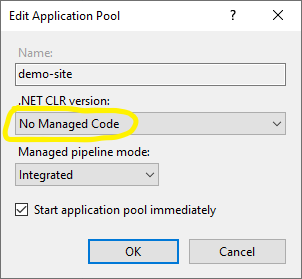
  • Under Application Pools, Right-click the site's app pool and select Basic Settings from the contextual menu. In the Edit Application Pool window, set the .NET CLR version to No Managed Code.

  • For ASP.NET Core 2.2 or later: For a 64-bit (x64) self-contained deployment that uses the in-process hosting model, you need to disable the app pool for 32-bit (x86) processes. For this, In the Actions sidebar of IIS Manager > Application Pools, select Advanced Settings.

  • Locate Enable 32-Bit Applications and set the value to False.

October 29, 2015

AngularJS - How to GET and POST data by http methods Get / Post

In this post, we will see how to use http requests in AngularJS. For the scope of this post, I assumed that we have already developed ASP.NET WebAPI, say for Products. So we have a ProductController which have action methods for CRUD operations. Lets see how we call that methods from AngularJS, I am using AngularJS factory method as a service componenet to communicate with server.

For example the following code snippet assumes you have a app module varaible defineds as demoApp, here we are creating a productFactory with a dependency parameter $http which we use to make requests to server.
 
demoApp.factory('productFactory', function ($http) {
}
This is how we create a get request over $http object, we passed a URL to ProductController and calling its Get method, which will return data in json string. We also passed 2 callback functions as parameters, first one is called if the request is successfull and the second will be called if request encountered any error.
$http.get('api/Product/Get').
 success(function (data, status, headers, config) {
  // successfully get json response from server
  console.log("get products list - success");
 }).
 error(function (data, status, headers, config) {
  // log error
  console.log(status);
});
This is how we can create a post request over $http object. First define an object, say config, which will define the request headers or other configuration properties. Here we are passing three parameters to the Post function, first is the URL with Controller's post action method, second is the object we want to pass as parameter/data to that function, third is our configuration object we want to set with this request.
  var config = {
  headers: { 'Content-Type': 'application/json' }
 }

$http.post('api/Product/PostProduct', product, config)
 .then(
  function (response, status, headers, config) {
     //sucessfully posted to server
     console.log('PostProduct success: ' + product.Id);
  },
  function (response, status, headers, config) {         
     //log error
     console.log('PostProduct failed.', response, status, headers);
  }
 );
Similarly following code segment will make a delete http request. Here we are only passing productID as query string parameter to the required URL, i.e. Controller's delete action method will accept an integer variable productID as parameter.
  var params = "productID=" + id;
$http.delete('api/Product/DeleteProduct?' + params)
 .then(
  function (response, status, headers) {
   //sucessfully processed delete request
   console.log('DeleteProduct success: ');
  },
  function (response, status, headers) {
   //log error
   console.log('DeleteProduct failed.', response, status, headers);
  }
 ); 
Hope this post helps you, give an idea how to deal with http methods in AngularJS.

October 24, 2015

No type was found that matches the controller named 'values'.

I created a new project for asp.net-webapi, added a default controller named ValuesController1. When I tried to run and call the controllers action methods I got this error:
No type was found that matches the controller named 'values'.

Even after a whole day spent on googling, I could not find any solution. There are so many post/suggestions to solve this error but no one worked for me. Then I just
tried simply to change the controller's name and it works amazingly.

When a new controller is added, it was like this:
  ValuesController1 : ApiController

I just simply removed "1" from the controller's name, and make it:

  ValuesController : ApiController

And it works in my case.